> ## Documentation Index
> Fetch the complete documentation index at: https://docs.doploy.io/llms.txt
> Use this file to discover all available pages before exploring further.
# Bring Your Own Server
> Connect your own server to doploy
## Overview
Connect your own server to doploy via SSH. Available on Pro plan and enterprise.
**Note:** Starter plan users must use [doploy-managed servers](/servers/doploy-servers).
## Requirements
**Supported Operating Systems:**
* Ubuntu 24.04 LTS
* Ubuntu 22.04 LTS
Your server should be a clean installation of Ubuntu.
## Step 1: Open Add Server Modal
From your project's Servers page, click "Add Server" and select "Bring Your Own Server".
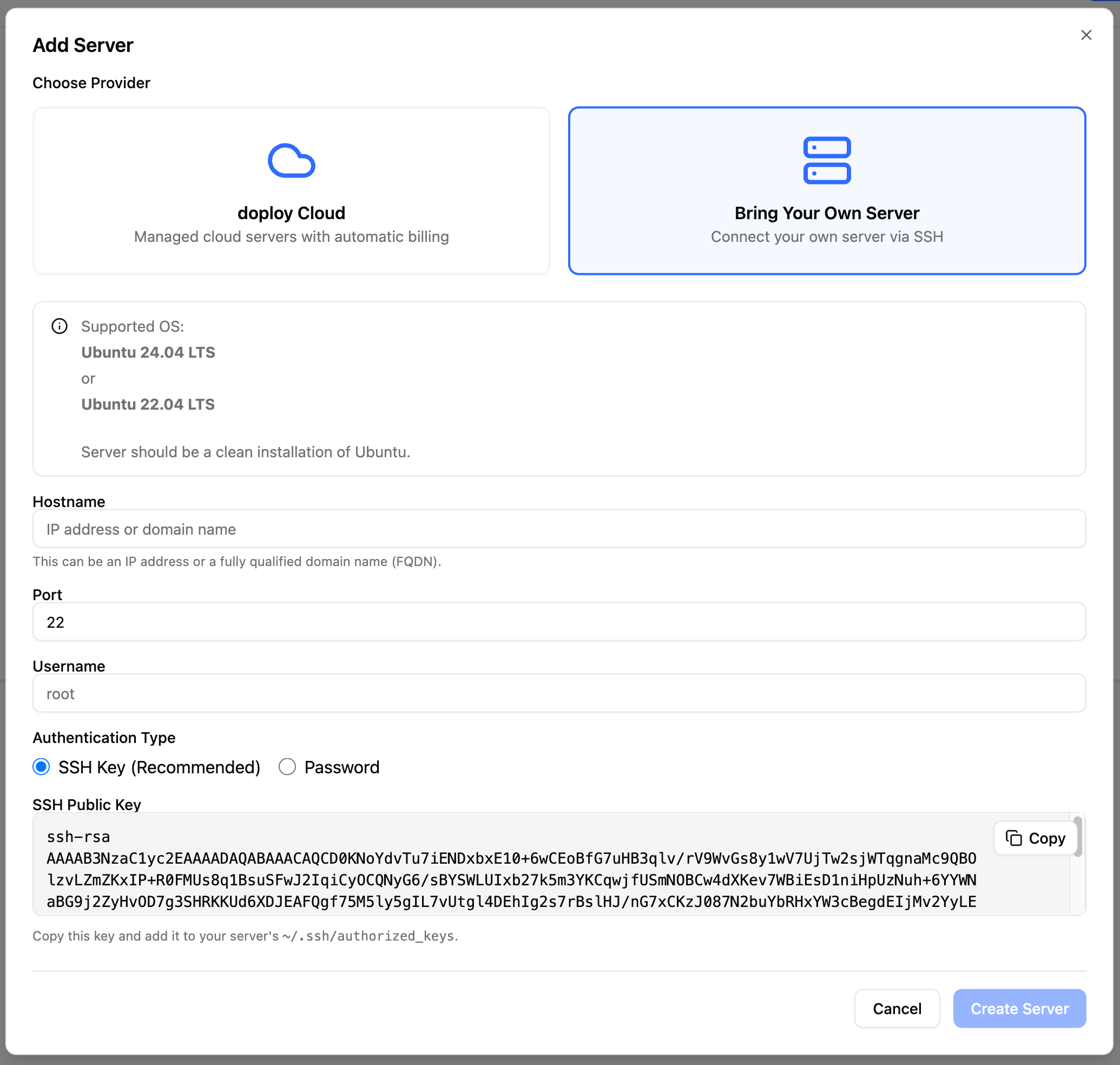 ## Step 2: Configure Server Details
Fill in your server connection details:
## Step 2: Configure Server Details
Fill in your server connection details:
 **Hostname** - Your server's IP address or fully qualified domain name (FQDN)
**Port** - SSH port (default: 22)
**Username** - SSH username with sudo access
## Step 3: Choose Authentication Method
### Option 1: SSH Key (Recommended)
Copy the displayed public SSH key shown and add it to your server's `~/.ssh/authorized_keys` file.
### Option 2: Password
Enter your SSH password. We recommend using SSH keys for better security.
## Step 4: Create Server
Click "Create Server" to connect. doploy will:
1. Verify SSH connection
2. Install required dependencies
3. Configure the server for Odoo deployments
## Next Steps
Once your server shows "Ready" status:
* [Enable automatic security updates](/servers/security-updates)
* [Create your first instance](/getting-started/creating-instance)
**Hostname** - Your server's IP address or fully qualified domain name (FQDN)
**Port** - SSH port (default: 22)
**Username** - SSH username with sudo access
## Step 3: Choose Authentication Method
### Option 1: SSH Key (Recommended)
Copy the displayed public SSH key shown and add it to your server's `~/.ssh/authorized_keys` file.
### Option 2: Password
Enter your SSH password. We recommend using SSH keys for better security.
## Step 4: Create Server
Click "Create Server" to connect. doploy will:
1. Verify SSH connection
2. Install required dependencies
3. Configure the server for Odoo deployments
## Next Steps
Once your server shows "Ready" status:
* [Enable automatic security updates](/servers/security-updates)
* [Create your first instance](/getting-started/creating-instance)