> ## Documentation Index
> Fetch the complete documentation index at: https://docs.doploy.io/llms.txt
> Use this file to discover all available pages before exploring further.
# Odoo Enterprise
> Set up and configure odoo Enterprise on doploy
## Overview
If you want access to Odoo Enterprise features, you need an active Odoo Enterprise license key. You can configure this anytime in your project settings.
## Prerequisites
* Active Odoo Enterprise subscription from Odoo
* Your Enterprise subscription code
## Step 1: Access Project Settings
From your project dashboard, click the "Settings" button to access your project configuration.
 ## Step 2: Navigate to General Settings
In the project settings, go to the "General" tab where you'll find the Odoo Enterprise configuration section.
## Step 2: Navigate to General Settings
In the project settings, go to the "General" tab where you'll find the Odoo Enterprise configuration section.
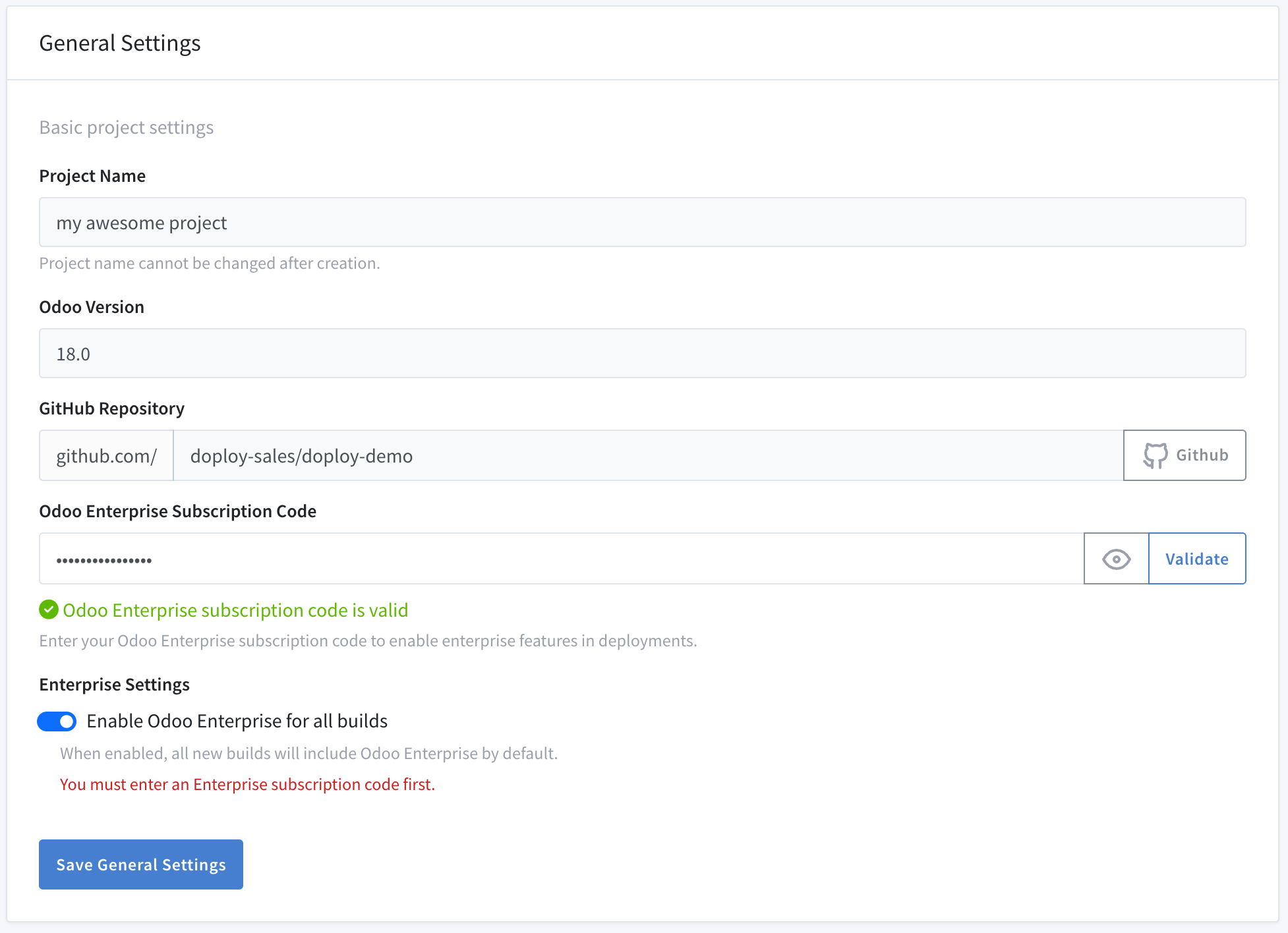 ## Step 3: Enter Your Enterprise Subscription Code
In the Odoo Enterprise section:
1. **Enter your subscription code** - Paste your Odoo Enterprise subscription code in the provided field
2. **Validate** - Click "Validate" to verify your subscription with Odoo
3. **Enable Enterprise** - Once validated, toggle "Enable Odoo Enterprise" to activate Enterprise features for all future builds
Your subscription code can be found in your Odoo Enterprise account or was provided when you purchased your license. If you need help, please contact doploy support.
## What Happens Next
Once Odoo Enterprise is enabled:
* **All new deployments** will include Odoo Enterprise modules
* **Existing instances** can be upgraded by going to the instance's settings
* **Enterprise modules** will be automatically available in your Odoo instance going forward
### Enterprise Modules Not Appearing
If Enterprise modules aren't showing up after enabling:
* Make sure you've enabled enterprise on pre-existing instances by going to the instance settings
* Contact doploy support
### Subscription Expired
If your subscription has expired:
* Renew your subscription with Odoo
* Update your subscription code in project settings
## Next Steps
Once your Odoo Enterprise access is configured, you're ready to [create your instance](/getting-started/creating-instance).
## Step 3: Enter Your Enterprise Subscription Code
In the Odoo Enterprise section:
1. **Enter your subscription code** - Paste your Odoo Enterprise subscription code in the provided field
2. **Validate** - Click "Validate" to verify your subscription with Odoo
3. **Enable Enterprise** - Once validated, toggle "Enable Odoo Enterprise" to activate Enterprise features for all future builds
Your subscription code can be found in your Odoo Enterprise account or was provided when you purchased your license. If you need help, please contact doploy support.
## What Happens Next
Once Odoo Enterprise is enabled:
* **All new deployments** will include Odoo Enterprise modules
* **Existing instances** can be upgraded by going to the instance's settings
* **Enterprise modules** will be automatically available in your Odoo instance going forward
### Enterprise Modules Not Appearing
If Enterprise modules aren't showing up after enabling:
* Make sure you've enabled enterprise on pre-existing instances by going to the instance settings
* Contact doploy support
### Subscription Expired
If your subscription has expired:
* Renew your subscription with Odoo
* Update your subscription code in project settings
## Next Steps
Once your Odoo Enterprise access is configured, you're ready to [create your instance](/getting-started/creating-instance).